How Unused Website Pages Can Wreck Your SEO: A Real-World WordPress Example
The Hidden Danger of "Digital Clutter"
When a new client approached us about their mysteriously declining search rankings, we initially focused on the usual suspects: backlink profiles, keyword optimization, and content quality. Everything seemed in order—until we discovered something lurking in their website's structure that was sabotaging their entire SEO strategy.
The culprit? Dozens of unused template pages from their WordPress theme that were still live, indexed by Google, and completely irrelevant to their business.
This isn't an isolated incident. In fact, this "digital clutter" problem affects countless websites, particularly those built using content management systems like WordPress where templates make it easy to create—and forget about—pages that aren't actively used.
The Real-World Example: A Template Disaster
Our client, a professional services firm in London, had invested considerable resources in their WordPress website. They'd selected a premium theme designed for their industry, customized the design, and even hired a copywriter to craft compelling content for their core pages.
Their traffic had been steadily growing for months after launch—until it suddenly wasn't.
What happened? During site development, their web designer had activated all of the theme's demo content to showcase different layout options. After finalizing the design, they removed menu links to unused pages but never actually deleted these pages from the system.
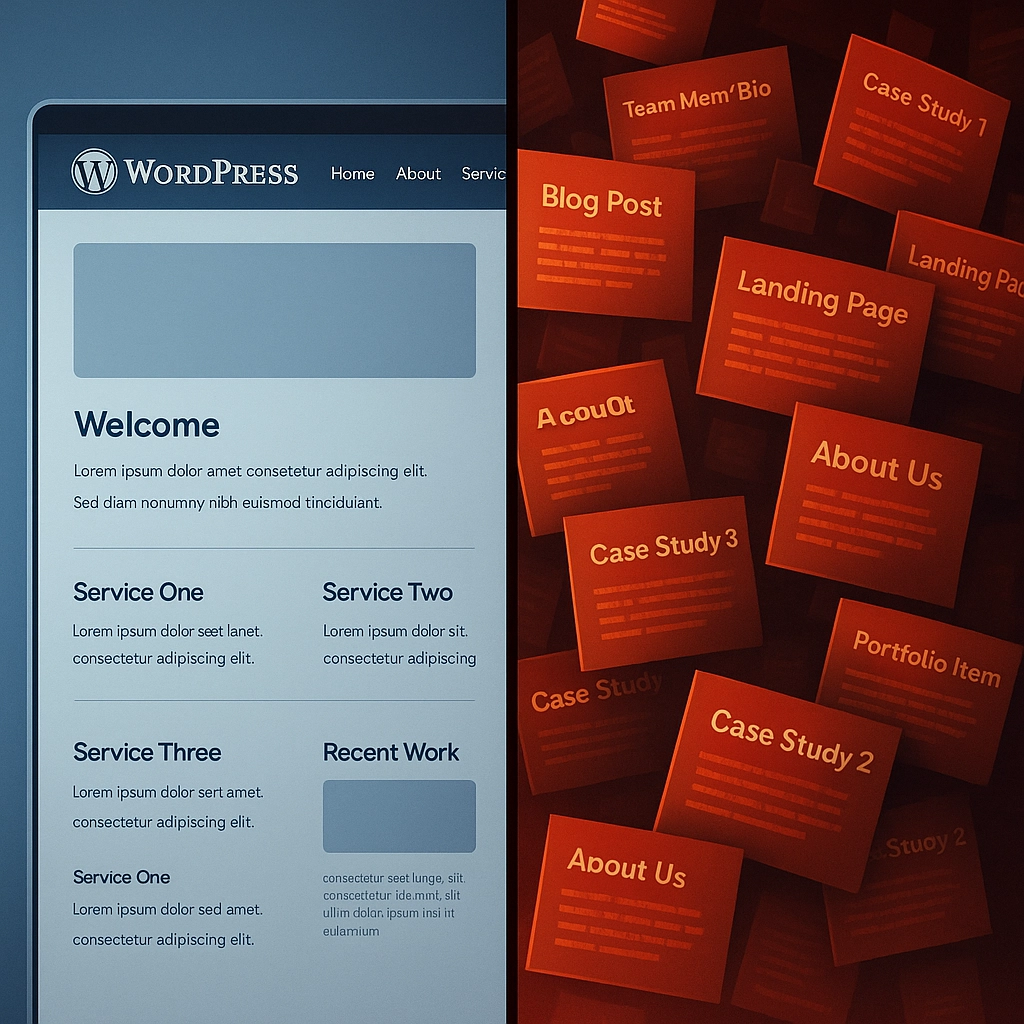
The result: more than 35 template pages with generic titles like "Our Process," "Team Member Bio," and "Case Study 3" remained live and accessible via direct URLs. Worse yet, these pages contained irrelevant placeholder content with industries, services, and even geographic locations that had nothing to do with our client's business.
How Google Interpreted This Digital Mess
Search engines like Google use sophisticated algorithms to evaluate website quality and relevance. When they encountered our client's site, here's what happened:
-
Mixed Signals: Google received conflicting information about what the business actually did. Was it a law firm in Manchester? A consultancy in Edinburgh? Both appeared in template content.
-
Content Quality Flags: The placeholder text triggered low-quality content alerts, as it was generic, thin, and didn't match the presumed purpose of the site.
-
Crawl Budget Wasted: Google's crawlers spent precious time indexing irrelevant pages instead of focusing on the valuable content.
-
Authority Dilution: Any domain authority the site had built was spread across dozens of pointless pages rather than concentrating on their core service offerings.
-
Topic Confusion: The keyword strategy became muddled as Google couldn't clearly determine the site's primary topics and expertise areas.
The measurable impact? A 67% drop in organic traffic over three months and a complete disappearance from page one rankings for their target keywords.
The Technical Impact on Search Engine Optimization
Crawl Budget Depletion
Every website is allocated a limited "crawl budget"—the number of pages Google will crawl and index within a certain timeframe. This budget is particularly precious for:
- New websites still establishing authority
- Larger sites with hundreds of pages
- Businesses in competitive industries
When Google wastes this budget on template pages, demo content, or duplicate articles, your valuable content gets crawled less frequently. For our client, Google's Search Console revealed that their core service pages were being crawled only once every 2-3 weeks—far too infrequently to register content updates or improvements.
Content Relevance Confusion
Search engines work hard to understand what your business is about. When they encounter contradictory information, they struggle to categorize your site properly.
Our client's unused template pages contained references to:
- 8 different industries (only 1 was relevant)
- 12 geographic locations (they only served 3)
- 15 service categories (they offered 4)
This hodgepodge of information created what SEO experts call "topic dilution," making it impossible for Google to confidently rank the site for its actual target keywords.

User Experience Metrics
It wasn't just Google that was confused—real users were too. Analytics showed that visitors occasionally stumbled upon these template pages through:
- Direct search results
- Site search functions
- Following outdated links
The result? Extremely high bounce rates (92%+) and minimal time on page (under 10 seconds), sending powerful negative signals back to Google about the site's overall quality and usefulness.
How to Identify This Problem on Your WordPress Site
Before you panic, let's check if your site has this issue. Here's a systematic approach:
1. Audit Your Content Inventory
Generate a complete list of all published pages on your WordPress site:
- Use the "All Pages" section in your WordPress admin
- Check your XML sitemap (typically found at yourdomain.com/sitemap.xml)
- Run a crawl tool like Screaming Frog to identify indexed pages
2. Check for Template Fingerprints
Look for these telltale signs of unused template pages:
- Generic titles (e.g., "Sample Page," "Team Member")
- Lorem ipsum text or placeholder content
- References to industries or services you don't offer
- Pages with no internal links pointing to them
- Duplicate page templates with minimal content differences
3. Verify Google Indexing Status
Confirm which problematic pages are actually in Google's index:
- Use the "site:" operator in Google (e.g., site:yourdomain.com "sample page")
- Check Google Search Console's "Coverage" report for indexed pages
- Look for pages receiving impressions but no clicks in Performance reports
For our client, this audit revealed that 28 of their 35 unused template pages were fully indexed in Google, with 7 even appearing occasionally in search results for unrelated queries.
The Solution: Clean Up Your Digital Space
Once we identified the problem, we implemented a comprehensive cleanup strategy:
1. Triage Content for Action
We categorized each page into action groups:
- Delete: Pages with no value, traffic, or backlinks
- Redirect: Pages with some value or external links
- Improve: Pages with potential that could be updated
- Retain: Core pages that should remain as-is
2. Implement Proper Redirects
For pages we removed, we set up 301 redirects to the most relevant existing pages to preserve any link equity and prevent user-facing 404 errors:
# Example redirect implementation in .htaccess
Redirect 301 /sample-page/ https://wolf.uk.com/services/
Redirect 301 /team-member-3/ https://wolf.uk.com/about/
3. Update the XML Sitemap
We regenerated the site's XML sitemap to reflect only the pages we wanted Google to index, eliminating all references to deleted content.
4. Request Accelerated Recrawling
Through Google Search Console, we:
- Submitted the updated sitemap
- Used the URL inspection tool to request reindexing of key pages
- Monitored coverage reports to confirm removal of unwanted content

Preventative Measures for the Future
To prevent this issue from recurring, we established these best practices:
For New WordPress Sites:
- Start Clean: Begin with a minimal installation and add only what you need
- Disable Sample Content: Remove WordPress's default "Sample Page" and "Hello World" post immediately
- Use Staging Environments: Test themes with all their templates in a staging environment, not on your live site
- Document All Pages: Maintain a content inventory spreadsheet listing every published page and its purpose
For Existing WordPress Sites:
- Quarterly Content Audits: Review all published content using tools like Yoast SEO or Rank Math
- Monitor Search Console: Regularly check for unexpectedly indexed pages
- Implement Robot Controls: Use robots.txt and meta robots tags to control indexing of utility pages
- Check Theme Updates: Verify that theme updates don't add new template pages
The Results: Recovery Is Possible
After implementing our cleanup strategy for the client, the results were dramatic:
- Week 1-2: Google recrawled the site and processed most of the changes
- Week 3-4: Previously declining keywords stabilized in rankings
- Month 2: Organic traffic increased by 34% compared to the previous month
- Month 3: The site regained and exceeded its previous traffic levels
Most importantly, the site's keyword focus became much clearer. Google now correctly associated the business with its actual services and locations, rather than the hodgepodge of industries mentioned in the template pages.
Conclusion: Digital Housekeeping Matters
This real-world example demonstrates how seemingly innocent template pages can wreak havoc on your SEO efforts. In the competitive digital landscape, allowing Google to index irrelevant, low-quality pages is like inviting a potential client to a meeting in a cluttered office filled with another company's brochures.
At Wolf Software Systems, we've seen this issue affect businesses across industries—from e-commerce to professional services. The good news is that with proper detection and correction, recovery is not just possible but often surprisingly quick.
Don't let digital clutter undermine your online presence. Take time to audit your website, clean up unnecessary pages, and maintain a focused, relevant digital footprint that accurately represents your business to both search engines and potential customers.
Need help identifying or fixing this issue on your WordPress site? Contact us for a comprehensive website audit that includes template page detection and remediation.